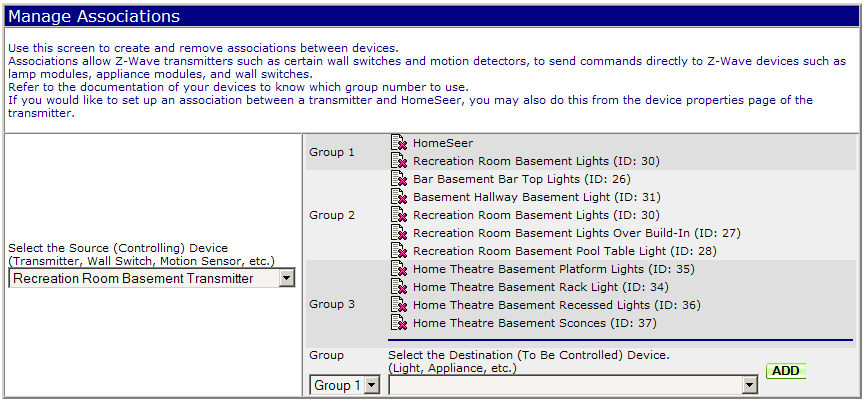
The Manage Associations section of the Manage Z-Wave page will only appear if your Z-Wave Interface supports association functions.
The interface shows a drop-down list of Z-Wave devices that are capable of being association SOURCE devices. The list of source devices will only contain those Z-Wave devices with this capability. Choose a device from the source list, and HomeSeer will query the device for any existing associations. When it is done, and if there are existing associations, they may appear on the right hand side similar to what is shown below.
Some Z-Wave devices support multiple association groups - that is, there is a way on the device to specify which group you wish to activate or deactivate. HomeSeer retrieves the group information from the device and allows you to assign destination (target) devices to one of the groups supported by the source device.
To Add an Association:
Select the group for the device to be associated with from the group drop-down list. Now, select a target Z-Wave device from the drop-down list of DESTINATION (target) devices. This list will usually be much larger than your source list as most devices can be the target of an association, but not all can be a source. After you have made your selections, click the ADD button to have HomeSeer make the association. HomeSeer will display a message if the association was successful or not.
To Remove an Association:
Click the small page icon with the red "X" next to the association that you wish to remove. HomeSeer will remove the association, and then it will re-display the associations. HomeSeer will display a message if the removal was not successful.