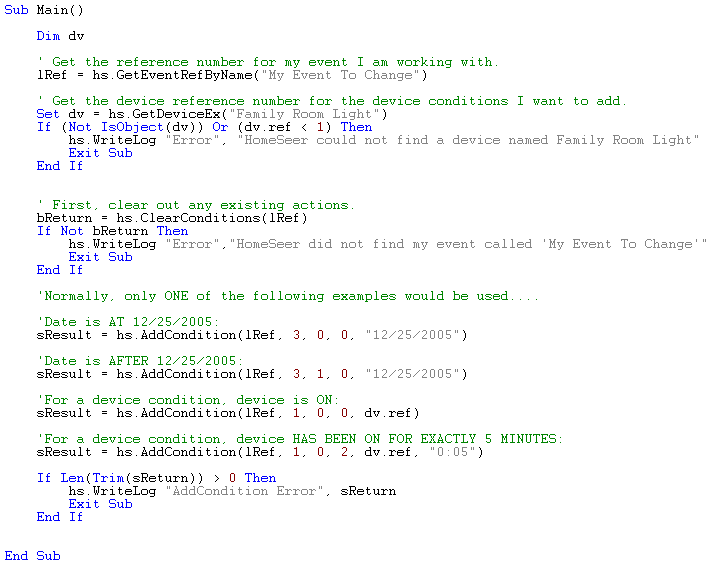
Adds a condition to an event given the event reference ID.
Parameter: evref
Type: long (.NET Integer)
Description: The event reference ID number, which may be obtained using
GetEventRefByName using the event name.
Parameter: cdtype
Type: integer (.NET Enum)
Description: The condition type to be added (see below).
Parameter: cdsubtype
Type: integer
Description: The condition sub-type for the condition type to be added
(see below).
Parameter: cdorindex
(optional)
Type: integer
Description: The "OR" index for the condition (see below).
Parameter: parm1
(optional)
Type: variant (.NET Object)
Description: Parameter 1 if required (see below).
Parameter: parm2
(optional)
Type: variant (.NET Object)
Description: Parameter 2 if required (see below).
Parameter: parm3
(optional)
Type: variant (.NET Object)
Description: Parameter 3 if required (see below).
Parameter: parm4
(optional)
Type: variant (.NET Object)
Description: Parameter 4 if required (see below).
Parameter: parm5
(optional)
Type: variant (.NET Object)
Description: Parameter 5 if required (see below).
Return value: result
Type: string
Description: An empty return means the operation completed successfully.
A non-empty
return string will be error information.
TYPE_TIME: 0
BEFORE_SUNSET: 0
AFTER_SUNSET: 1
BEFORE_SUNRISE: 2
AFTER_SUNRISE: 3
BEFORE_SUNSET_OFFSET: 4
AFTER_SUNSET_OFFSET: 5
BEFORE_SUNRISE_OFFSET: 6
AFTER_SUNRISE_OFFSET: 7
AT: 8
BEFORE: 9
AFTER: 10
DAY: 11
NIGHT: 12
TYPE_DEVICE: 1
IS_ON: 0
IS_OFF: 1
HAS_BEEN_ON: 2
HAS_BEEN_OFF: 3
X10_ON: 4
X10_OFF: 5
X10_DIM: 6
X10_BRIGHT: 7
HAS_BEEN_ON_MORE: 8
HAS_BEEN_OFF_MORE: 9
X10_ANY: 10
VALUE_EQUALS: 11
VALUE_NOTEQUAL: 12
VALUE_RANGE: 13
TYPE_PLUG-IN: 2
Not Applicable
TYPE_DATE: 3
AT: 0
AFTER: 1
BEFORE: 2
TYPE_D_W_LEFT: 4
Unused for this type, use any value: 0
TYPE_DAYS_BETWEEN: 5
Unused for this type, use any value: 0
TYPE_DAY_IS: 6
Unused for this type, use any value: 0
TYPE_DAY_EVEN_ODD: 7
Unused for this type, use any value: 0
TYPE_MOON_IS: 8
Unused for this type, use any value: 0
Parameter 1: The
date desired - e.g. 12/25/2005.
(May
be STRING or DATE type, use STRING if you wish to use M, D, or Y wildcard
characters.)
Parameter 2: The device command, which
may be the numeric command values used in the device condition type.
Parameter 3:
The device value.
Parameter 4:
The device string value to be set to the device.
Parameter 1: The time desired, e.g. "13:23" or "1:23 PM".
or
Parameter 1: For
time offset sub-types, the offset amount, e.g. "0:25" (0 hours,
25 minutes).
Parameter 1: The
device reference ID numer.
Parameter 2: For device condition sub-types
requiring a duration or a value, e.g. "0:25" (duration) or 48
(value).
Parameter 1: The
complete plug-in condition string.
Note: Plug-in condition strings are formatted to the HomeSeer Plug-In API
specification and contain unprintable characters - this string should
be obtained directly from the plug-in or with information from the plug-in
author on how to construct it.
Parameter 1: The
days left condition type value from this table:
DAYS_LEFT_YEAR
= 1
DAYS_LEFT_MONTH
= 2
WEEKS_LEFT
= 3
DAY_OF_YEAR_IS
= 4
DAY_OF_MONTH_IS
= 5
WEEK_OF_YEAR_IS
= 6
Parameter 2: The days left comparison
type from this table:
EQUAL
= 0
MORE_THAN
= 1
LESS_THAN
= 2
Parameter 3:
The value for the comparison (integer).
Parameter 1: A
value indicating weekdays between or weekend days between from this table:
WEEKDAYS_BETWEEN
= 1
WEEKEND_DAYS_BETWEEN
= 2
Parameter 2: The days between comparison
type from this table:
EXACTLY
= 0
MORE_THAN
= 1
LESS_THAN
= 2
Parameter 3: The value for the comparison
(integer).
Parameter 4: The first date for the in-between
dates calculation.
(May
be STRING type to use M, D, or Y wildcards, or a DATE type.)
Parameter 5: The second date for the in-between
dates calculation.
(May
be STRING type to use M, D, or Y wildcards, or a DATE type.)
Parameter 1: The
day frequency number value for the comparison, taken from this table:
FIRST
= 1
SECOND
= 2
THIRD
= 3
FOURTH
= 4
LAST
= 5
Parameter 2: The day of the week being
looked for. Use
the values from this table:
SUNDAY
= 0
MONDAY
= 1
TUESDAY
= 2
WEDNESDAY
= 3
THURSDAY
= 4
FRIDAY
= 5
SATURDAY
= 6
WEEKDAY
= 7
WEEKEND_DAY
= 8
Parameter 3: The month number for the
comparison from this table:
JANUARY
= 1
FEBRUARY
= 2
MARCH
= 3
APRIL
= 4
MAY
= 5
JUNE
= 6
JULY
= 7
AUGUST
= 8
SEPTEMBER
= 9
OCTOBER
= 10
NOVEMBER
= 11
DECEMBER
= 12
ANY_MONTH
= 13
Parameter 1: The
value of the even/odd condition desired from this table:
MONTH_EVEN
= 1
MONTH_ODD
= 2
YEAR_EVEN
= 3
YEAR_ODD
= 4
Parameter 1: The
value corresponding to the moon phase desired for the condition from this
table:
WANING_CRESCENT
= 1
LAST_QUARTER
= 2
WANING_GIBBOUS
= 3
FULL_MOON
= 4
WAXING_GIBBOUS
= 5
FIRST_QUARTER
= 6
WAXING_CRESCENT
= 7
NEW_MOON
= 8